Perplexity AI vs. Google NotebookLM: The Ultimate Research & Software Intelligence Breakdown
When exploring the modern AI stack for research, knowledge curation, and enterprise productivity, two heavyweights frequently dominate the conversation: Perplexity AI and Google NotebookLM.
While both serve as advanced AI-driven research assistants, they are fundamentally different tools designed for entirely different stages of a workflow. Rather than direct competitors, they function best as complementary engines—one built for discovery, and the other built for synthesis.
Core Philosophy: Outward Search vs. Inward Synthesis
The easiest way to understand the distinction is to look at where they source their intelligence:
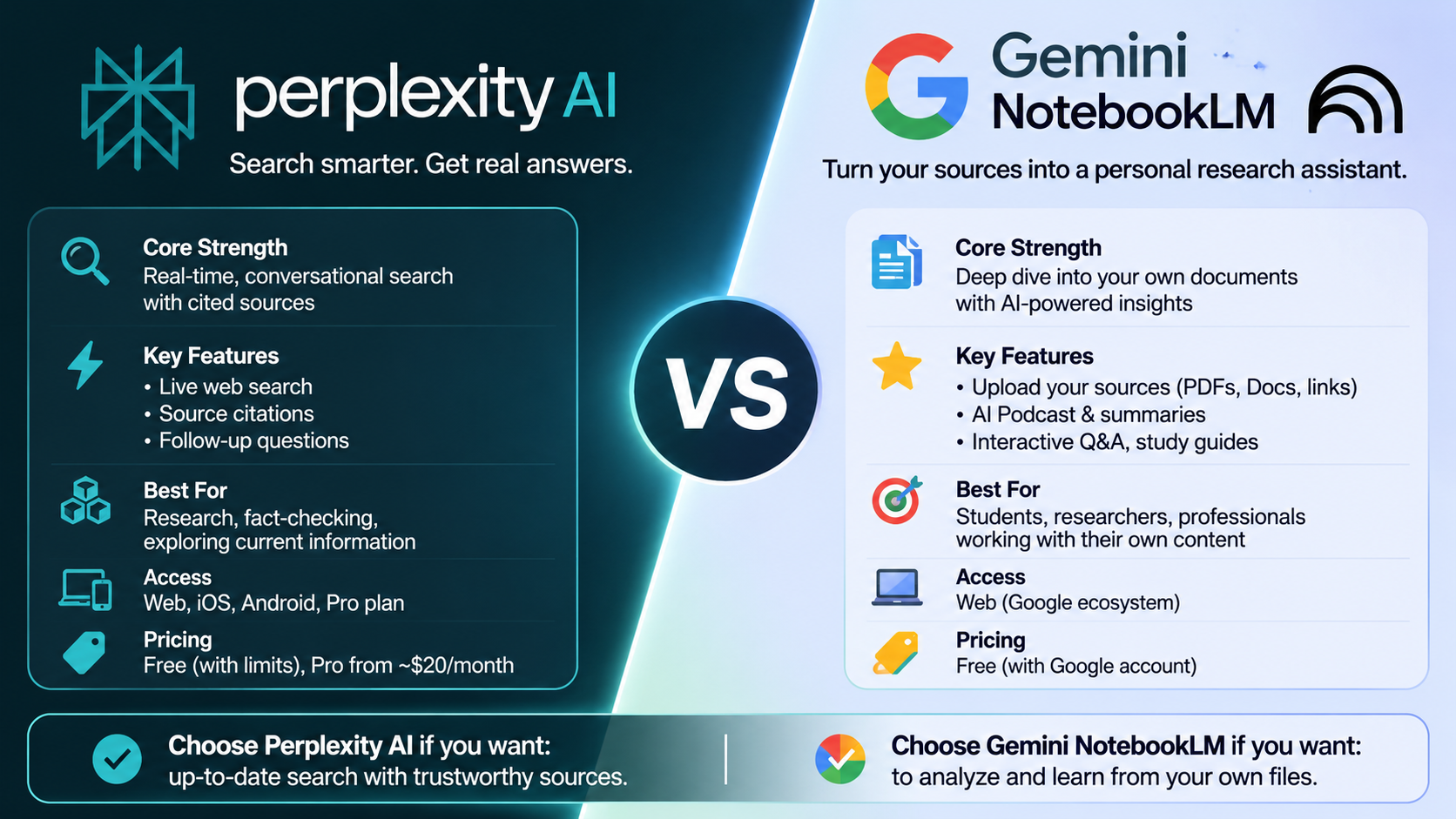
Perplexity AI (The Research Front Door): Perplexity operates as an advanced AI search engine. It looks outward, scanning the live, open web in real time to answer queries, pull current data, track breaking news, and provide cited web sources.
Google NotebookLM (The Research Back Room): NotebookLM operates as a source-grounded workspace. It looks inward, restricted entirely to a closed ecosystem of documents, PDFs, notes, or web links that you explicitly upload. It does not search the live web.
Comprehensive Individual Comparison: Perplexity AI vs. Google NotebookLM (Gemini Notebook)
1. Perplexity AI: Deep-Dive Analysis
Architecture & Core Purpose
Perplexity AI functions fundamentally as an agentic conversational search engine and software research assistant. Rather than organizing links or returning standard search page outputs, it leverages large language models combined with real-time retrieval-augmented generation (RAG) to scan the live web, synthesize facts, and formulate text responses complete with inline citations. It is engineered primarily for outward-facing discovery, horizon scanning, and dynamic fact-finding.
Key Operational Capabilities & Features
Pro Search Engine: A specialized query mode that parses complex queries by executing dozens of sequential web searches, scanning hundreds of independent sources per prompt, and occasionally asking clarifying questions to hone in on user intent.
Deep Research Mode: An automated research agent that conducts recursive, multi-step web exploration over an extended timeframe, compiling extensive synthesis reports on complex or niche topics.
Model-Agnostic Model Council: Paid tiers allow users to route specific prompts across different frontier models (such as variants from OpenAI, Anthropic, or Perplexity’s native Sonar models) to compare output metrics side-by-side.
Spaces & Project Vaults: Dedicated workspaces that let users group persistent query threads, files, and reference materials around specific research initiatives or software evaluation projects.
Comet Browser Integration: A native browser integration designed to execute tasks, surface context, and interact directly with web-based workflows using local processing and multi-app API links.
Strengths
Unmatched Information Freshness: Because it accesses the live open web, it provides immediate context on real-time events, current pricing updates, software releases, and breaking announcements.
Rapid Breadth Mapping: Ideal for initial market discovery where the user does not yet possess documents or source files and needs to discover what exists online.
Multi–Model Flexibility: Provides freedom to switch underlying large language models depending on whether the task requires deep reasoning, concise summarization, or technical analysis.
Limitations & Constraints
Open-Web Hallucination Inheritance: Grounding answers in live web pages reduces fabricated data, but the system can still misinterpret external articles or cite low-authority sources that contain factual errors.
External Noise: Because it aggregates from the public internet, results can be diluted by SEO-optimized content, conflicting viewpoints, or publisher paywalls.
Best For
Market Researchers and Founders: Looking to discover emerging software stacks, analyze competitor landscapes, and track breaking technology news in real time.
Initial Discovery Phases: Anyone starting a project who needs to rapidly scan the open internet to find foundational reports, documentation links, and public reference material.
2. Google NotebookLM (Gemini Notebook): Deep-Dive Analysis
Architecture & Core Purpose
Google NotebookLM (integrated into the broader ecosystem as Gemini Notebook) operates as a private, source-grounded intelligence workspace. It is explicitly designed to look inward, restricting its knowledge base exclusively to closed sets of documents, files, and links uploaded by the user. It does not perform open-web queries by default, focusing instead on deep document synthesis, contextual interrogation, and material formatting.
Key Operational Capabilities & Features
Massive Multi-Format Ingestion: Supports an extensive range of source files, including PDFs, Google Docs and Slides, Microsoft Word and Excel files, CSVs, raw audio files, web page links, public YouTube video transcripts, EPUB ebooks, and Google Play Books titles.
Strict Source Grounding: Every generated answer, summary, or report is mapped directly to specific lines and segments inside the user’s uploaded files, minimizing external assumptions.
Studio Production Suite: Transforms raw document collections into structured learning and presentation assets, including interactive study guides, flashcards, quizzes, mind maps, data tables, and editable slide decks exportable to PowerPoint (PPTX).
Audio & Video Overviews (Podcasts): Automatically generates conversational two-host audio discussions or structured video explainers that synthesize uploaded documents into digestible multimedia formats supporting dozens of languages.
Secure Cloud Computer & Code Execution: Features isolated runtime environments that allow the system to write and execute code directly against uploaded datasets for advanced trend analysis and data computation without requiring external software.
Strengths
Absolute Contextual Precision: Ingestion handles massive token contexts, allowing users to upload entire libraries of reference manuals, research papers, or business specs and query them with pinpoint accuracy.
Zero External Hallucination Risk: Because responses are strictly bound to user-provided source text, the risk of injecting external web errors or unverified claims is drastically reduced.
Powerful Multimedia Transformation: Converts text-heavy archives into interactive study tools, slide decks, and audio-visual summaries instantly.
Limitations & Constraints
No Native Open-Web Searching: It cannot scan the live internet for brand-new developments, real-time market changes, or unlinked web data outside of the explicit files uploaded to the workspace.
Upfront Curation Burden: The utility of the tool depends entirely on the user’s ability to gather, clean, and upload high-quality source files before any analysis can begin.
Best For
Students, Academics, and Analysts: Working with dense libraries of private documents, textbooks, research papers, or internal whitepapers that require deep analysis without outside noise.
Content Repurposing: Professionals who want to turn text-heavy files, specifications, or data dumps into interactive audio podcasts, study guides, and presentation decks automatically.
Conclusion
Ultimately, Perplexity AI and Google NotebookLM represent two opposing sides of the modern knowledge management coin. Perplexity AI acts as your outward-facing scout—scouring the live web to bring you the newest ideas, tools, and facts from the open internet. Google NotebookLM acts as your inward-facing analyst—locking you in a private room with your chosen documents to extract every ounce of meaning, build study guides, and synthesize deep insights.
For maximum workflow efficiency, the ideal strategy isn’t choosing a winner between the two, but utilizing Perplexity to find what matters on the web, and feeding those findings directly into NotebookLM to build your master research repository.