
Clipchamp (by Microsoft)
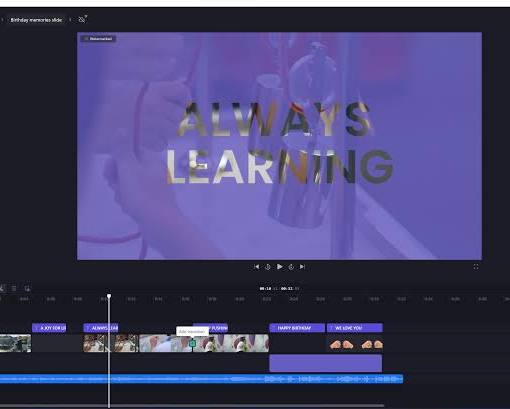
Unlock your creativity with Microsoft Clipchamp, the intuitive video creation tool designed for creators, educators, and businesses. Whether you need to produce quick TikTok shorts, polished YouTube videos, or engaging team presentations, Clipchamp delivers a seamless workflow without the steep learning curve.
Key Features
-
Smart AI Tools: Automatically generate accurate auto-captions/subtitles, convert text to realistic AI voiceovers, and auto-compose videos in minutes.
-
Built-in Screen & Camera Recorder: Effortlessly record your screen, webcam, or both simultaneously to build clear tutorial and demo videos.
-
Rich Content Library & Brand Kit: Access customizable video templates, royalty-free stock footage, graphics, audio tracks, and maintain brand consistency with custom logos, fonts, and colors.
-
Flexible Aspect Ratios & HD Export: Easily resize videos for 16:9, 9:16 (TikTok/Reels), or 1:1 formats, and export watermark-free videos in 1080p HD.
-
Seamless Microsoft Integration: Pre-installed on Windows 11 and directly integrated with Microsoft 365, OneDrive, and SharePoint.
Pros:
-
Beginner-Friendly Interface: Intuitive drag-and-drop timeline that requires no prior editing experience.
-
Generous Free Tier: Free plan allows unlimited 1080p exports with no annoying watermarks.
-
Time-Saving AI: Built-in auto-captioning and text-to-speech significantly speed up content creation.
-
No Heavy Software Needed: Runs smoothly in-browser or as a lightweight desktop app on Windows.
Cons:
-
Limited Advanced Controls: Lacks complex color grading, keyframing, and multi-track audio controls found in professional software.
-
Requires Microsoft 365 Subscription for Premium Stock: Premium stock assets and specialized features are locked behind a paid subscription.
-
Performance on Large Files: Export rendering can slow down or stall when processing long or heavy 4K projects.